

Verifying webhooks, websockets and callback requests from Recall.ai
Verify webhook, websocket, and callback requests from Recall using HMAC verfication signatures so you only accept verified events.
You can use this sample app to see how to verify requests from Recall.
Overview
Limited support for verification on the Desktop SDKVerification is not currently supported on real-time webhook/websockets from the Desktop SDK. Async webhooks for the Desktop SDK are fully supported.
There are several different scenarios/features that require Recall to send data to your app:
- Delivering webhooks events in real-time or async
- Delivering websocket events in real-time
- Requesting tokens from your app (e.g. using signed-in Zoom bots)
When you receive these events or requests, you need to verify they are valid requests from Recall.
Getting your verification secrets
Legacy accounts use separate signing secrets for Svix webhooksUse the following secret and headers to verify requests:
Request type Account created before December 15, 2025 Account created on or after December 15, 2025 Svix webhooks Svix endpoint signing secret; svix-*headersWorkspace verification secret; webhook-*headersReal-Time Webhook Endpoints, Real-Time Websocket Endpoints, and supported signed callbacks Workspace verification secret; webhook-*headersWorkspace verification secret; webhook-*headersThe header sets are:
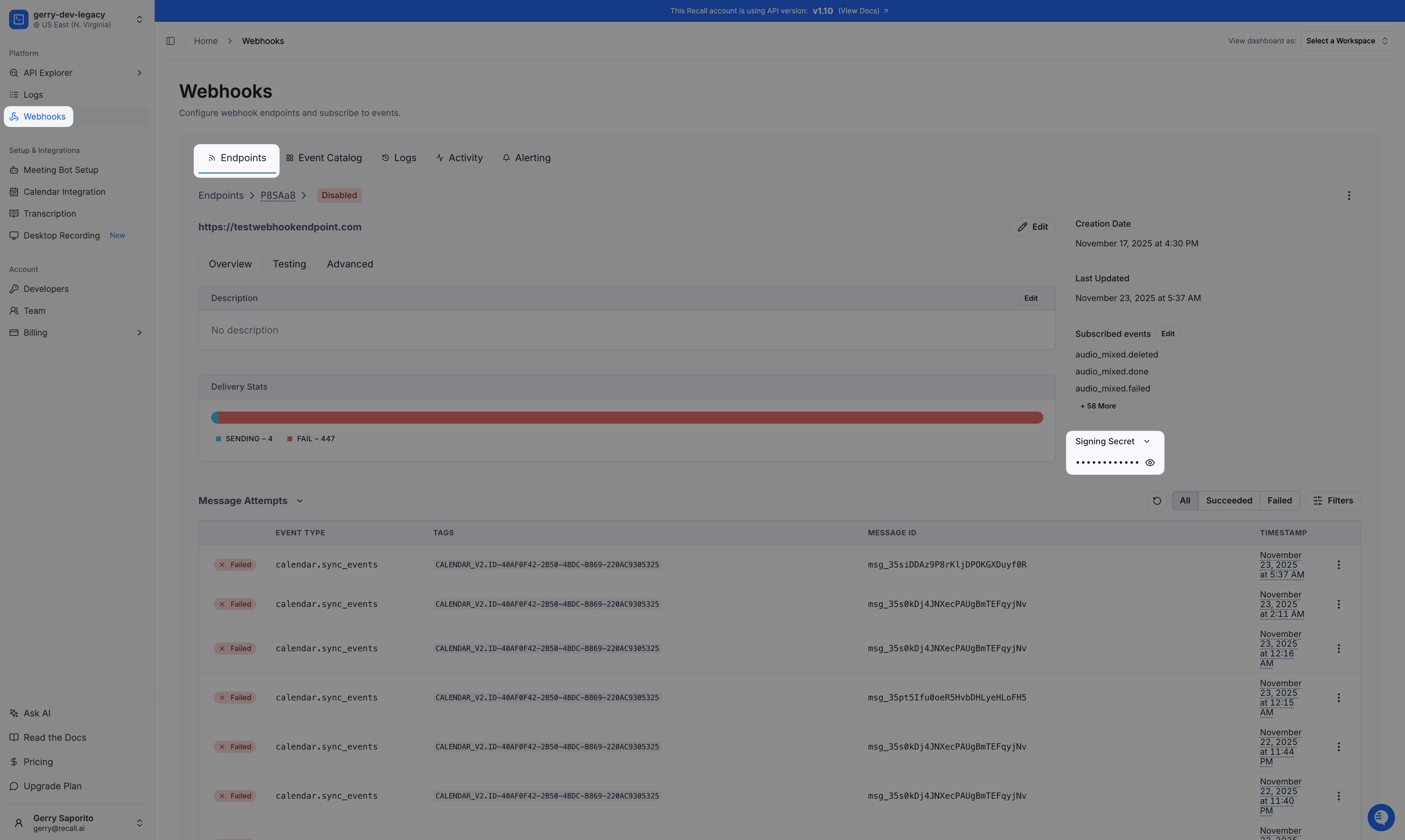
svix-*:svix-id,svix-timestamp, andsvix-signature.webhook-*:webhook-id,webhook-timestamp, andwebhook-signature.For legacy Svix endpoint signing secret, you can find it on the webhooks dashboard. Each endpoint has its own secret:
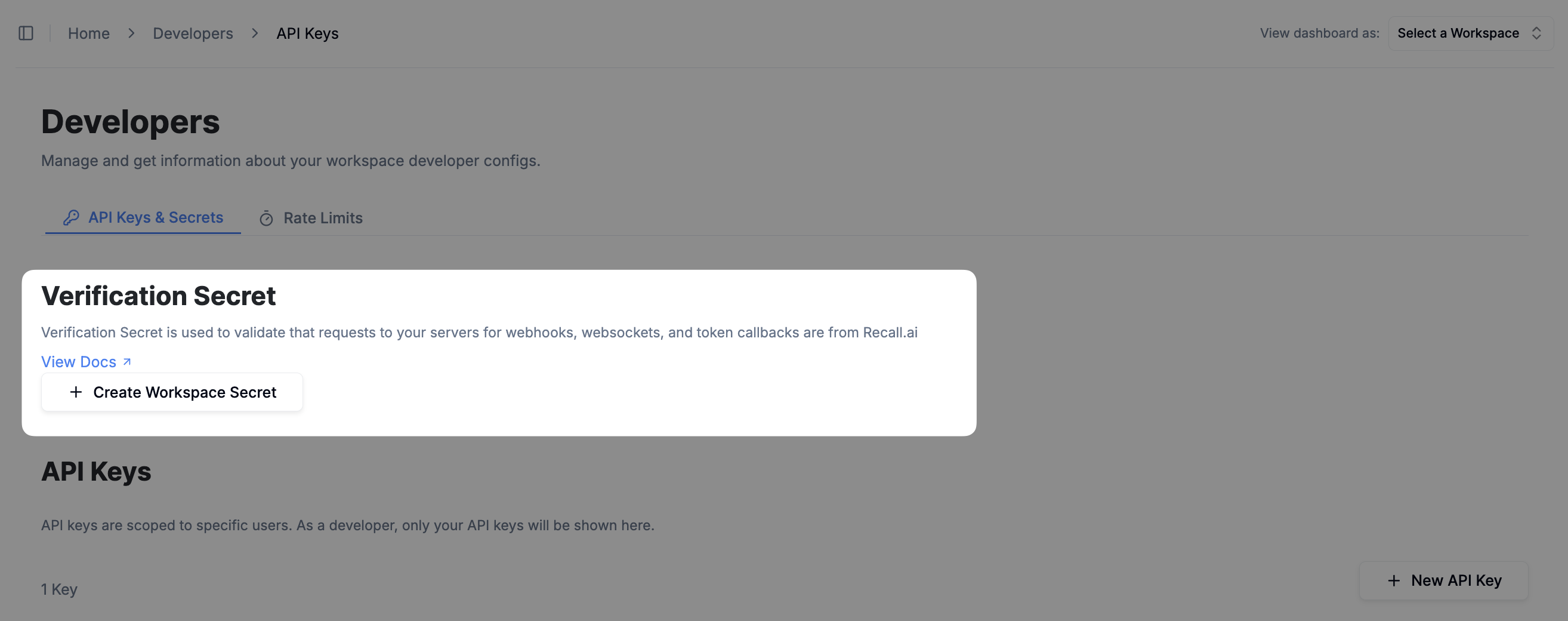
Continue below to find or create your workspace verification secret.
You can generate a single verification secret from the dashboard in the API keys page to verify all requests (webhooks, websockets, callbacks) from Recall.
Verifying requests
Once you create a workspace secret, all requests from Recall will include the headers webhook-id, webhook-timestamp, and webhook-signature. They will look like:
Webhook-Id: 'msg_loFOjxBNrRLzqYUf'
Webhook-Timestamp: '1731705121'
Webhook-Signature: 'v1,rAvfW3dJ/X/qxhsaXPOyyCGmRKsaKWcsNccKXlIktD0='
Note that you must create the workspace secret, otherwise these headers will not be included in the requests
Function to verify requests from Recall
Then you can verify requests using the following function:
import crypto from "crypto"
import { Buffer } from "buffer";

export const verifyRequestFromRecall = (args: {
    // Workspace verification or Svix webhook secret
    secret: string,
    // Incoming request header
    headers: Record<string, string>,
    // Incoming raw request payload (if present). Use null if not applicable (e.g. GET or UPGRADE requests)
    payload: string | null,
}) => {
    const { secret, headers, payload } = args;
    const msgId = headers["webhook-id"] ?? headers["svix-id"];
    const msgTimestamp = headers["webhook-timestamp"] ?? headers["svix-timestamp"];
    const msgSignature = headers["webhook-signature"] ?? headers["svix-signature"];

    if (!secret || !secret.startsWith("whsec_")) {
        throw new Error(`Verification secret (${secret}is missing or invalid`);
    }
    if (!msgId || !msgTimestamp || !msgSignature) {
        throw new Error(`Missing webhook ID (${msgId}), timestamp (${msgTimestamp}), or signature (${msgSignature})`);
    }

    // Create the expected signature
    const prefix = "whsec_";
    const base64Part = secret.startsWith(prefix) ? secret.slice(prefix.length) : secret;
    const key = Buffer.from(base64Part, "base64");

    let payloadStr = '';
    if (payload) {
        if (Buffer.isBuffer(payload)) {
            payloadStr = payload.toString("utf8");
        } else if (typeof payload === 'string') {
            payloadStr = payload;
        }
    }

    const toSign = `${msgId}.${msgTimestamp}.${payloadStr}`;
    const expectedSig = crypto
        .createHmac("sha256", key)
        .update(toSign)
        .digest("base64");

    // Compare the expected signature to the signatures passed in the header
    const passedSigs = msgSignature.split(" ")
    for (const versionedSig of passedSigs) {
        const [version, signature] = versionedSig.split(",")
        if (version != "v1") {
            continue
        }
        const sigBytes = Buffer.from(signature, 'base64')
        const expectedSigBytes = Buffer.from(expectedSig, 'base64')
        if (expectedSigBytes.length === sigBytes.length && crypto.timingSafeEqual(new Uint8Array(expectedSigBytes), new Uint8Array(sigBytes))) {
            return
        }
    }

    // If no matching signature is found, throw an error
    throw new Error("No matching signature found");
}
Verifying HTTP requests
For HTTP requests, every request will include the verification headers listed above. See below for an example on how to verify HTTP requests using the above function:
import http from "http";
import { WebSocketServer } from "ws";
import { env } from "./config/env";
import { verifyRequestFromRecall } from "./verify-request-from-recall";

const server = http.createServer();

/**
 * HTTP server for handling HTTP requests from Recall.ai
 */
server.on("request", async (req, res) => {
    try {
        // Get request headers
        const headers = Object.fromEntries(
            Object.entries(req.headers)
                .map(([key, value]) => [
                    key.toLowerCase(),
                    typeof value === "string" ? value : value?.join(",") ?? ''
                ])
        )

        switch (req.method) {
            // Verify GET requests which don't have a body/payload
            case "GET": {
                verifyRequestFromRecall({
                    secret: env.VERIFICATION_SECRET,
                    headers,
                    payload: null,
                });

                break;
            }
            // Verify requests which have a body/payload
            case "POST": {
                // Must be the raw body from the request
                const bodyChunks: Buffer[] = [];
                for await (const chunk of req) {
                    bodyChunks.push(chunk);
                }
                const rawBody = Buffer.concat(bodyChunks).toString("utf-8");

                verifyRequestFromRecall({
                    secret: env.VERIFICATION_SECRET,
                    headers,
                    payload: rawBody,
                });

                break;
            }
            default: {
                throw new Error(`Method not allowed: ${req.method}`);
            }
        }

        console.log(`HTTP request verified: ${req.method} ${req.url}`);
        res.writeHead(200, { "Content-Type": "text/plain" });
        res.end("HTTP request verified");
    } catch (error) {
        console.error(`Error verifying HTTP request from Recall.ai: ${req.method} ${req.url}`, error);
        res.writeHead(400, { "Content-Type": "text/plain" });
        res.end("Request not verified");
    }
});

/**
 * Start the server
 */
server.listen(env.PORT, "0.0.0.0", () => {
    console.log(`Server is running on port ${env.PORT}`);
});
Verifying WebSockets
For WebSockets, the headers are attached to the initial HTTP Upgrade request, and the payload will be empty. See below for an example on how to verify HTTP requests using the above function:
import http from "http";
import { WebSocketServer } from "ws";
import { env } from "./config/env";
import { verifyRequestFromRecall } from "./verify-request-from-recall";

const server = http.createServer();

/**
 * WebSocket server for handling WebSocket requests from Recall.ai
 */
const wss = new WebSocketServer({ noServer: true });
wss.on("connection", (socket) => {
    socket.on("message", rawMsg => {
        console.log("Message received", rawMsg.toString());
    });

    socket.on("close", () => {
        console.log("Socket closed");
    });
});

server.on("upgrade", (req, socket, head) => {
    try {
        const headers = Object.fromEntries(
            Object.entries(req.headers)
                .map(([key, value]) => [key.toLowerCase(), typeof value === "string" ? value : value?.join(",") ?? ''])
        )

        // Verify WebSocket requests on upgrade
        verifyRequestFromRecall({
            secret: env.VERIFICATION_SECRET,
            headers,
            payload: null,
        });

        wss.handleUpgrade(req, socket, head, (ws) => {
            wss.emit("connection", ws, req);
        });

        console.log(`WebSocket request verified: ${req.method} ${req.url}`);
        socket.write("WebSocket connection upgraded");
    } catch (error) {
        console.error(`Error verifying WebSocket request from Recall.ai: ${req.method} ${req.url}`, error);
        socket.destroy();
    }
});

/**
 * Start the server
 */
server.listen(env.PORT, "0.0.0.0", () => {
    console.log(`Server is running on port ${env.PORT}`);
});
FAQ
Is there a set of static IPs or domains to allowlist?
For Svix Webhooks, you can allowlist the following set of IPs.
For all other webhooks, websockets, or callbacks, there is no set of IPs you can allowlist, as these services do not use static IPs. Unfortunately, this means you cannot allowlist a fixed set of IPs for these requests.
How to rotate a verification secret?
If your secret ever leaks or needs to be replaced, you can create a new secret using the same zero downtime secret rotation policy offered by Svix.
After rotating your workspace secret, the previous secret will remain active for 24 hours. During this period, events from Recall to your servers will contain multiple signatures for each of the secrets that are currently valid.
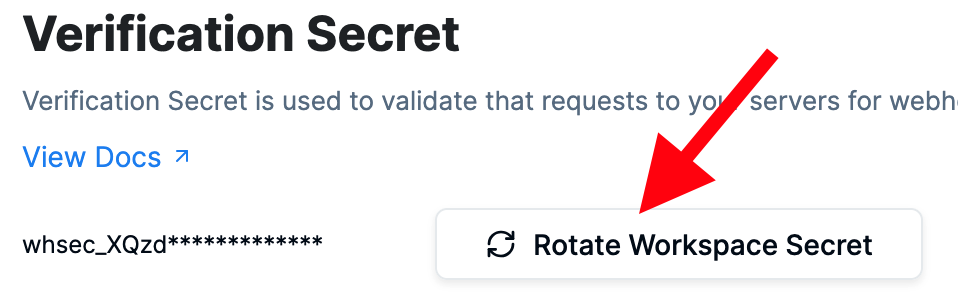
A workspace can only have a maximum of 9 currently active secrets
Further attempts to rotate the secret will fail, and you'll need to wait until the oldest secret has expired before rotating again
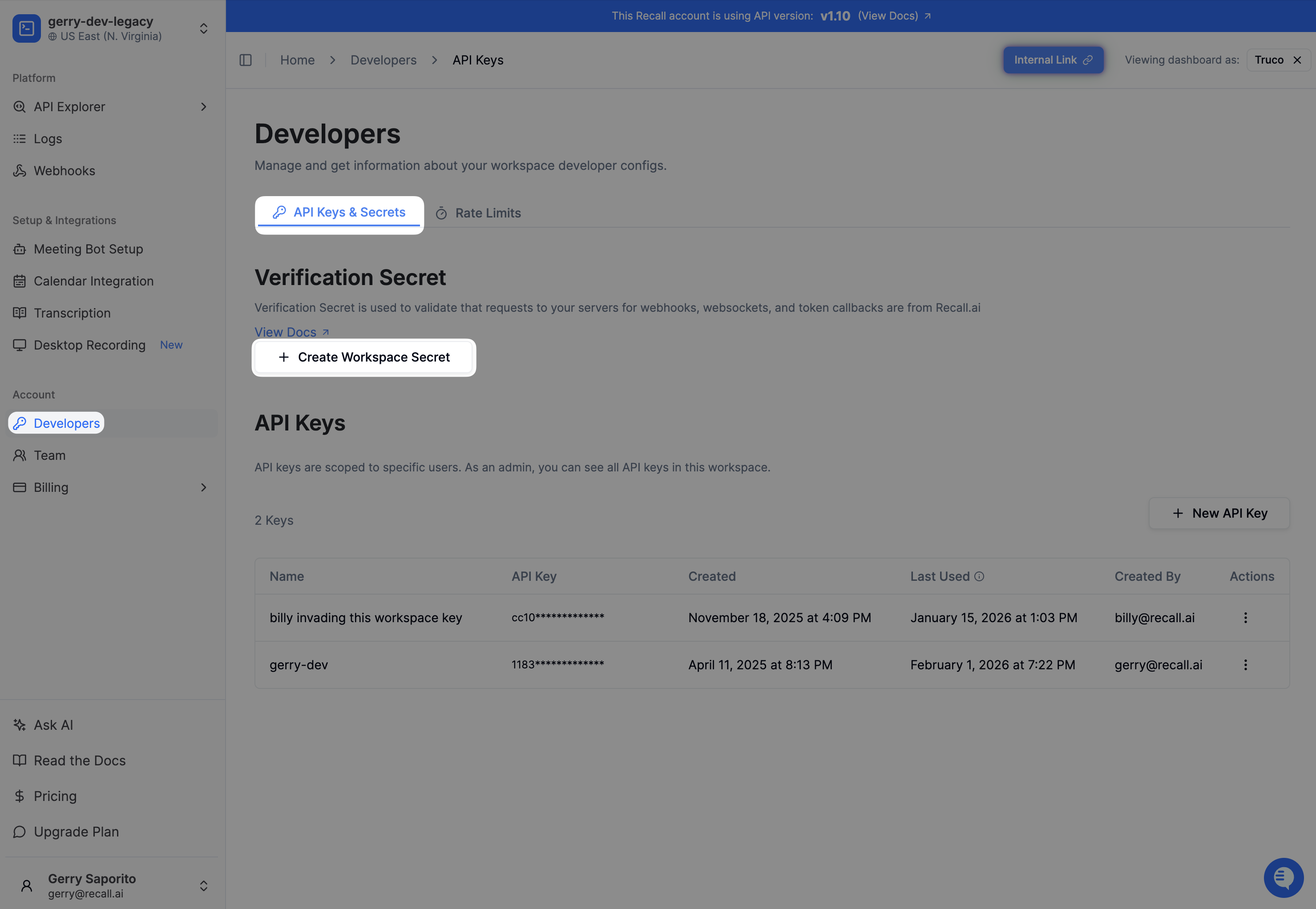
Why are the request's verification headers missing?
Request verification headers are only sent once you have a workspace verification secret. You can create one from the dashboard under Developers > API Keys & Secrets > Create Workspace Secret
Why am I receiving multiple signatures from Recall webhooks?
Multiple signatures indicate that your secret has been rotated recently. As a best practice, you should set up alerting on your end when you start receiving multiple signatures to make sure that you're using the most recent and up-to-date secret, since the old secret will expire after 24 hours.
Updated 11 days ago