

MCP
Connect Recall’s MCP server to your AI agent to grant read access to the platform.
Overview
Connect Recall.ai to an MCP-compatible AI client so your agent can investigate bots, inspect workspace data, search Recall.ai documentation, and help build or debug your integration.
What You Can Do
Use the Recall.ai MCP server to:
- Investigate why a bot failed to join, record, or produce a transcript.
- Inspect bot lifecycle events, participants, chat messages, and customer-visible logs.
- Trace calendar-created bots and diagnose calendar sync problems.
- Inspect webhook subscriptions, events, and delivery attempts.
- Find recordings, transcripts, and generated media artifacts.
- Check Recall.ai and third-party provider status incidents.
- Search Recall.ai guides and API reference pages
- Review billed usage, credit balances, and configured API rate limits.
- Optionally create or update webhook endpoints, send test webhooks, and submit rate-limit increase requests.
The MCP allows agents to view all the same data that a developer can, without being constrainted to what the API offers.
Quickstart
Find your LLM agent below.
Claude Desktop/Claude Code
-
Head to the Recall.ai connector page
-
Hit the "Connect to Claude" button

Claude Code (terminal)
Alternatively, if you want to add the MCP directly via the terminal:
claude mcp add --scope user --transport http recall-ai https://us-east-1.recall.ai/mcpYou'll then want to login:
claude mcp login recall-aiDevin
-
Open Devin Customize and select Plugins. Choose Personal for your own sessions or Organization to share the plugin with your team.
-
Click Add plugin → From repository.
-
Enter
https://github.com/recallai/devin-recall, leave Subdirectory blank, and click Add.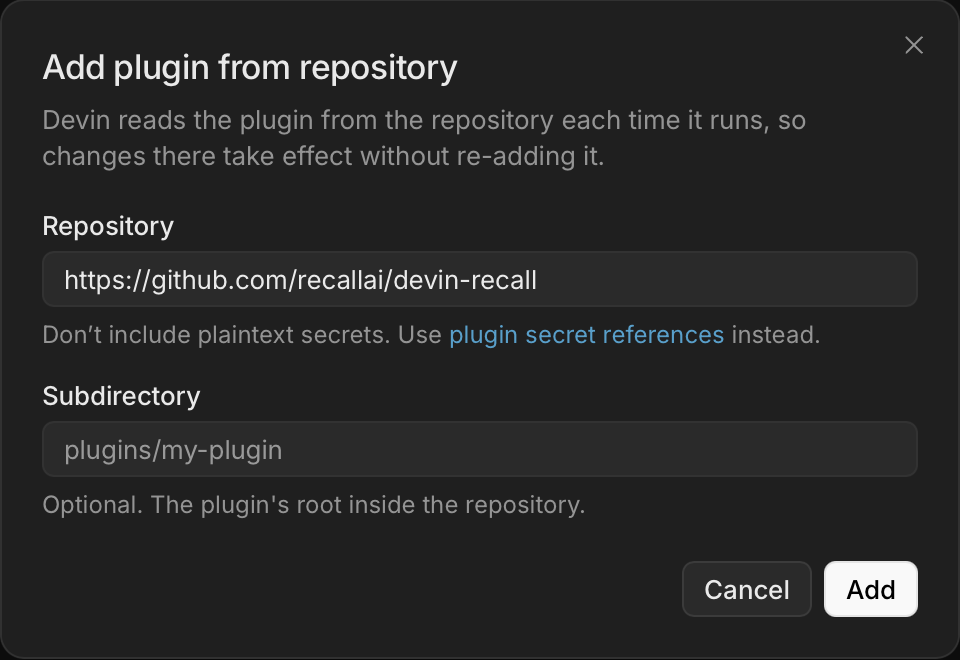
-
After indexing finishes, open MCPs → recall → Connect and sign in to Recall.ai. Start a new Devin session to use the connection.
Codex
codex mcp add recall-ai --url https://us-east-1.recall.ai/mcpThen complete the Recall.ai OAuth flow when prompted.
Cursor
Add the following to ~/.cursor/mcp.json:
{
  "mcpServers": {
    "recall-ai": {
      "url": "https://us-east-1.recall.ai/mcp"
    }
  }
}
Windsurf
Add the following to ~/.codeium/mcp_config.json:
{
  "mcpServers": {
    "recall-ai": {
      "serverUrl": "https://us-east-1.recall.ai/mcp"
    }
  }
}
3. Verify the Connection
Ask your agent:
Use Recall.ai's
get_infotool and tell me the active workspace, organization, and API version. List all the tool calls that the recall-ai MCP supports.
Confirm that the response names the expected workspace before using workspace data or write tools.
Authentication and Workspace Access
Use OAuth when a person is connecting their own AI client. They sign in through the browser, and the connection can access the same Recall.ai billing accounts they can access.
Use a scoped MCP API key for an unattended or shared agent, or when another person should not receive all the access your OAuth connection has. Each key can be limited to one workspace and only the MCP capabilities that person or agent needs.
OAuth
OAuth grants the MCP server access to all billing accounts available to the signed-in user. The workspace selected during authorization becomes the default workspace, but the connection can access the user's other billing accounts and workspaces.
To work with a different workspace:
- Use
list_workspacesto find the desired workspace ID. - Pass that ID as
workspace_idto workspace-scoped tools.
OAuth connections receive read access by default. Write tools require an explicit full or fine-grained write scope.
Scoped MCP API Keys
Create a separate key for each person or agent. This lets you restrict and revoke their access independently.
Create a Key
Create scoped keys from Dashboard → Developers → MCP API Keys in the workspace the agent should access:
- Select New MCP API Key.
- Give the key a descriptive name.
- Choose full read access or specific read permissions.
- Turn off full write access unless the agent needs a write tool.
- If needed, grant only the relevant fine-grained write permission.
- Create the key and copy it immediately to a secure secret store.
An MCP API key:
- Is restricted to the workspace in which it was created.
- Can call only tools allowed by its configured scopes.
- Cannot use the Recall.ai REST API.
- Does not expose tools for scopes it was not granted.
- Has immutable scopes. Revoke and replace the key to change its access.
- Remains active until revoked.
Do not paste an MCP API key into a prompt or commit it to source control.
Authenticate an Agent
Use the MCP endpoint for the region containing the key's workspace:
| Region | MCP URL |
|---|---|
| US East | https://us-east-1.recall.ai/mcp |
| US West | https://us-west-2.recall.ai/mcp |
| Europe | https://eu-central-1.recall.ai/mcp |
| Asia Pacific | https://ap-northeast-1.recall.ai/mcp |
Configure the agent to send the key as a bearer token with every MCP request:
Authorization: Bearer <MCP_API_KEY>Claude Code with an MCP API Key
claude mcp add --scope user --transport http recall-ai https://us-east-1.recall.ai/mcp \
  --header "Authorization: Bearer <MCP_API_KEY>"
Codex with an MCP API Key
Store the key in an environment variable:
export RECALL_MCP_API_KEY='<MCP_API_KEY>'Add the following to ~/.codex/config.toml:
[mcp_servers.recall-ai]
url = "https://us-east-1.recall.ai/mcp"
bearer_token_env_var = "RECALL_MCP_API_KEY"
The MCP API Keys page provides ready-to-copy setup instructions for Cursor, VS Code, Windsurf, Claude Code, Claude Desktop, and Codex.
After connecting, run get_info and confirm that the agent can access only the intended workspace.
Permissions
Read Permissions
mcp.read grants access to every read tool available through MCP. For least-privilege agents, use fine-grained scopes instead:
| Scope | Access |
|---|---|
mcp.account.read | Account, workspace, and billed-usage information |
mcp.bots.read | Bot metadata, status changes, and lifecycle events |
mcp.bot_participants.read | Participant identities and participant events |
mcp.bot_chat.read | Chat messages captured by bots |
mcp.calendars.read | Calendars and synced calendar events |
mcp.calendar_events.raw.read | Raw provider calendar-event payloads |
mcp.docs.read | Recall.ai documentation and API reference search |
mcp.logs.read | Customer-visible bot and workspace logs |
mcp.rate_limits.read | Configured API rate limits |
mcp.recordings.read | Recording metadata and media artifacts |
mcp.status.read | Recall.ai and third-party provider status |
mcp.transcripts.read | Meeting transcripts and speaker timelines |
mcp.webhooks.read | Webhook endpoints and delivery history |
mcp.billing.read | Billing and usage info |
Some tool results contain conditionally protected fields. For example, get_bot requires participant or chat scopes before it returns those fields.
Write Permissions
The server has no write access by default. mcp.write grants every write capability available through MCP. Prefer the fine-grained write scopes for autonomous or shared agents:
| Scope | Tools | External effect |
|---|---|---|
mcp.rate_limits.write | submit_rate_limit_increase_request | Submits a request to Recall.ai support for review |
mcp.webhooks.write | create_webhook_endpoint, update_webhook_endpoint, send_test_webhook_endpoint | Changes dashboard webhook configuration or sends a test event |
Write tools are not shown to credentials that lack the required scope. Your MCP client may also ask for confirmation before running a write tool.
Developer Permissions
Developer permissions are separate from read and write permissions because they can expose or create credentials. Neither mcp.read nor mcp.write grants access to developer tools.
mcp.dev grants every developer capability. For least-privilege agents, use the fine-grained scopes instead:
| Scope | Tools | Access |
|---|---|---|
mcp.dev.credentials.read | get_webhook_verification_secret, list_api_keys | Reads webhook verification secrets and existing API key data. |
mcp.dev.api_keys.create | create_api_key | Creates REST API keys or scoped MCP API keys. |
Grant developer permissions only to trusted people or agents that need to configure an integration. Treat mcp.dev.credentials.read as sensitive even though its tools are read-only.
Available Tools
The Recall.ai MCP server exposes read-only tools scoped to the workspace selected during authorization. If your account can access multiple workspaces, use list_workspaces to find the workspace ID and pass it as workspace_id to workspace-scoped tools.
| Tool Name | Description | Use Case |
|---|---|---|
get_info | Shows the current user, workspace, organization, and API version. | Confirm the agent is connected to the intended workspace. |
list_workspaces | Lists workspaces available to the authenticated account. | Locate the workspace containing a customer's failed bot. |
list_regions | Lists regions available to the current connection. | Identify where a customer's workspace is hosted. |
get_service_status | Shows current customer-visible Recall.ai service health. | Confirm whether an active outage affects recordings. |
list_service_incidents | Lists past customer-visible Recall.ai service incidents. | Determine whether an outage coincided with a failed meeting. |
get_third_party_provider_status | Shows current public health for meeting and transcription providers. | Confirm whether an upstream issue is delaying transcripts. |
list_third_party_provider_incidents | Lists historical public incidents for meeting and transcription providers. | Trace a transcription failure to an upstream incident. |
list_rate_limits | Lists configured Recall.ai API rate limits. | Explain 429 responses from a bot-creation endpoint. |
list_bot_usage | Lists metered bot usage records for a billing account. | Identify bots behind an unexpected usage spike. |
get_billed_usage | Fetches billed usage, commitments, and credit balances. | Reconcile billed usage against remaining credits. |
submit_rate_limit_increase_request | Submits an API rate-limit increase request for review. | Request capacity before a high-volume migration. |
get_webhook_verification_secret | Fetches the workspace webhook verification secret. | Validate signatures while deploying a webhook receiver. |
list_api_keys | Lists API keys for a workspace. | Locate credentials to rotate after suspected exposure. |
create_api_key | Creates a Recall.ai API or MCP API key. | Provision a scoped key for an automation agent. |
list_webhook_endpoints | Lists webhook destinations and their event subscriptions. | Confirm transcript.done is subscribed before tracing delivery. |
create_webhook_endpoint | Creates a dashboard webhook endpoint. | Add a recording.done destination for a new service. |
update_webhook_endpoint | Updates a dashboard webhook endpoint. | Redirect deliveries after moving a webhook receiver. |
send_test_webhook_endpoint | Sends a test event to a configured webhook endpoint. | Confirm a receiver accepts a test recording.done event. |
replay_webhook_message | Replays an existing webhook message to an endpoint. | Resend an event after repairing the receiver. |
list_webhook_deliveries | Lists webhook events and delivery attempts for a resource. | Trace why a recording.done webhook never arrived. |
list_bots | Lists bots filtered by status, platform, meeting, or metadata. | Locate bots created for a particular meeting URL. |
get_bot_batch | Fetches detailed information for multiple bots. | Compare lifecycle events across several failed bots. |
get_bot | Fetches a bot's metadata, lifecycle, participants, and chat. | Explain why one bot exited a meeting early. |
list_recordings | Lists recordings filtered by bot, upload, metadata, status, or time. | Locate recordings produced by a specific bot. |
list_audio_mixed | Lists generated mixed-audio artifacts and their statuses. | Confirm whether mixed audio is ready to download. |
get_recording_resource | Fetches recording or transcript artifact details by ID. | Locate a transcript artifact's parent recording. |
list_calendars | Lists calendar integrations by email, platform, or connection status. | Find disconnected calendars for a user's email. |
get_calendar | Fetches details for a single calendar integration. | Confirm whether a calendar disconnected after sync failures. |
get_calendar_integration_setup_status | Shows Calendar V2 setup readiness, recommendations, and blockers. | Explain what prevents a new calendar connection. |
start_calendar_integration_setup | Starts an assisted Calendar V2 integration setup. | Begin guided setup for a new calendar. |
get_calendar_integration_setup | Shows progress for a Calendar V2 integration setup. | Identify the next required calendar-setup action. |
continue_calendar_integration_setup | Advances a Calendar V2 setup to its next action. | Continue setup after creating calendar authorization credentials. |
create_calendar_v2 | Creates a Calendar V2 integration with supplied credentials. | Provision a calendar during headless onboarding. |
update_calendar_v2 | Updates Calendar V2 credentials, webhook settings, or metadata. | Repair expired credentials without recreating a calendar. |
reconnect_calendar_v2 | Reconnects a disconnected Calendar V2 integration. | Restore calendar syncing after credential repair. |
list_calendar_events | Lists synced calendar events by calendar, time, or deletion state. | Locate invites expected to schedule bots. |
get_calendar_event | Fetches details for a single synced calendar event. | Explain why an invite did not schedule a bot. |
get_bot_calendar_events | Returns the calendar events that scheduled a bot. | Trace a bot back to its calendar invite. |
get_bot_logs | Fetches customer-visible runtime logs for a bot. | Explain why a bot failed to join or record. |
get_desktop_sdk_logs | Fetches customer-visible runtime logs for a Desktop SDK upload. | Explain why a Desktop SDK upload failed. |
get_workspace_logs | Fetches customer-visible workspace logs within a time window. | Trace API 429s during a launch window. |
list_docs | Lists Recall.ai documentation and API reference pages. | Locate the slug for a product guide. |
search_docs | Searches Recall.ai documentation and API reference pages. | Find guidance for a specific endpoint error. |
get_doc | Fetches a Recall.ai documentation page by slug. | Summarize required fields for a known endpoint. |
Example Workflows
Investigate a Failed Bot
Prompt your agent:
Why did bot
<BOT_ID>fail? Use its status changes and customer-visible logs, explain the causal chain, and link the relevant Recall.ai documentation.
The agent can use get_bot, get_bot_logs, search_docs, and get_doc. If the available evidence does not establish a cause, the response should say what is known and what evidence is still missing.
You can also ask about an internal customer, user, or interview ID if you included it in the bot's metadata. The bot quickstart shows how to add these IDs when creating a bot.
Trace a Missing Webhook
Prompt your agent:
Why did we not receive
transcript.donefor recording<RECORDING_ID>? Check our subscriptions and delivery attempts.
The agent can use list_webhook_endpoints and list_webhook_deliveries to distinguish a missing subscription from a failed delivery.
Trace a Calendar-Created Bot
Prompt your agent:
Which calendar event scheduled bot
<BOT_ID>, and what was the calendar's connection state?
The agent can use get_bot_calendar_events and get_calendar.
Configure a Webhook
With mcp.webhooks.write, prompt your agent:
Create a webhook endpoint for
recording.doneat<WEBHOOK_URL>. Show me the proposed change and ask for confirmation before creating it.
The agent can use create_webhook_endpoint after you confirm the destination and event subscription.
Search Recall.ai Documentation
Prompt your agent:
Find the current Recall.ai documentation for creating a meeting bot and summarize the required request fields for this workspace's API version.
The agent can use search_docs followed by get_doc.
Updated 3 days ago