

Calendar Integration FAQ
Find answers to common calendar integration limits, OAuth scope issues, and sync behavior so you can troubleshoot faster.
How far into the future are calendar events synced in the API?
4 weeks.
How long does Recall store calendar data?
Recall will retain calendar data up to 60 days in the past for both Calendar V1 & V2 integrations. Calendar events past 60 days are automatically removed and not available via the API.
How do I add a bot to a calendar event via email?
You may prefer a user flow where you can invite an email (eg. [email protected]) to any meeting, and the bot will join.
You can accomplish this with the Recall Calendar Integration by:
- Creating an email on your end (e.g. [email protected])
- Connecting that user to the Recall calendar integration
- Setting the calendar integration to automatically record every meeting on the calendar
This will assign a meeting bot to all events that your chosen email address is invited to.
Does the calendar integration support team/shared/non-primary calendars?
Currently only the primary calendar of connected users are supported.
Are Microsoft Exchange On-premise Calendars supported?
Currently Microsoft Exchange On-premise calendars are not supported.
Are there limits to the number of calendars I can connect?
There's no limit to the number of unique calendar emails you can connect.
Why do two Recall calendar events have different attendee information for the same underlying event?
Data for the same event on different users' calendars can appear different because of user-level event visibility settings.
How is the meeting_url populated when there are multiple links on the calendar invite?
meeting_url populated when there are multiple links on the calendar invite?In the case when a calendar event has multiple meeting links populated, the default meeting_url is populated according to this order of precedence:
- The default meeting url (often defined by the click to join meeting button)
- The meeting URL in the description/body
In the case when there are multiple meeting links in the description, the order of precedence is as follows: Zoom, Google Meet, Teams, Webex, GoTo Meeting.
With Calendar V2, you can override the
meeting_urlwhen calling the Schedule Bot For Calendar Event endpoint to select the meeting URL you'd like the bot to join.
How to make Google Calendar scopes mandatory?
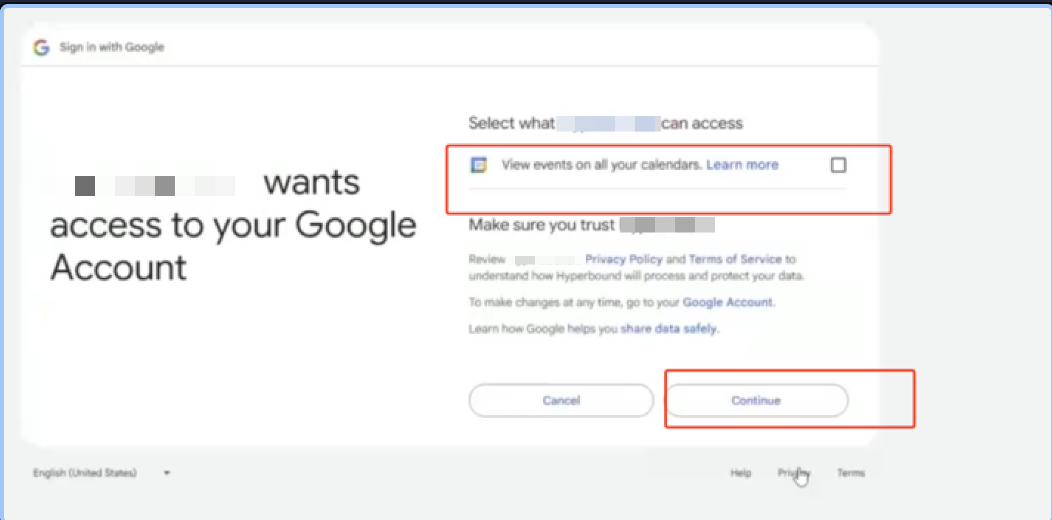
Google enforces granular permissions, meaning you cannot force users to select every checkbox. While internal apps bypass these selections for users within your own workspace, external customers can always opt-out of specific scopes.
To ensure your app gets all scopes, you must perform a scope check by inspecting the scope parameter in the authorization response. If the required calendar scope is missing, redirect the user to a page explaining why it is necessary and trigger a new request using prompt=consent to force the consent screen to reappear.
This incremental authorization strategy allows you to request only the missing permissions when needed. If a user continues to deny access, your application should gracefully handle the state by limiting features rather than failing
Troubleshooting
invalid_scope error
invalid_scope errorEven after setting up your OAuth client and successfully integrating calendars, you may see an invalid_scope error:
"invalid_scope(detail: None of the supported calendar scopes(['https://www.googleapis.com/auth/calendar.events.readonly', 'https://www.googleapis.com/auth/calendar.readonly', 'https://www.googleapis.com/auth/calendar.events', 'https://www.googleapis.com/auth/calendar']) present in response(['https://www.googleapis.com/auth/userinfo.email', 'openid']).)"This happens when the user is connecting their calendar for the first time, and doesn't select the checkbox to allow your app to view their calendar events.
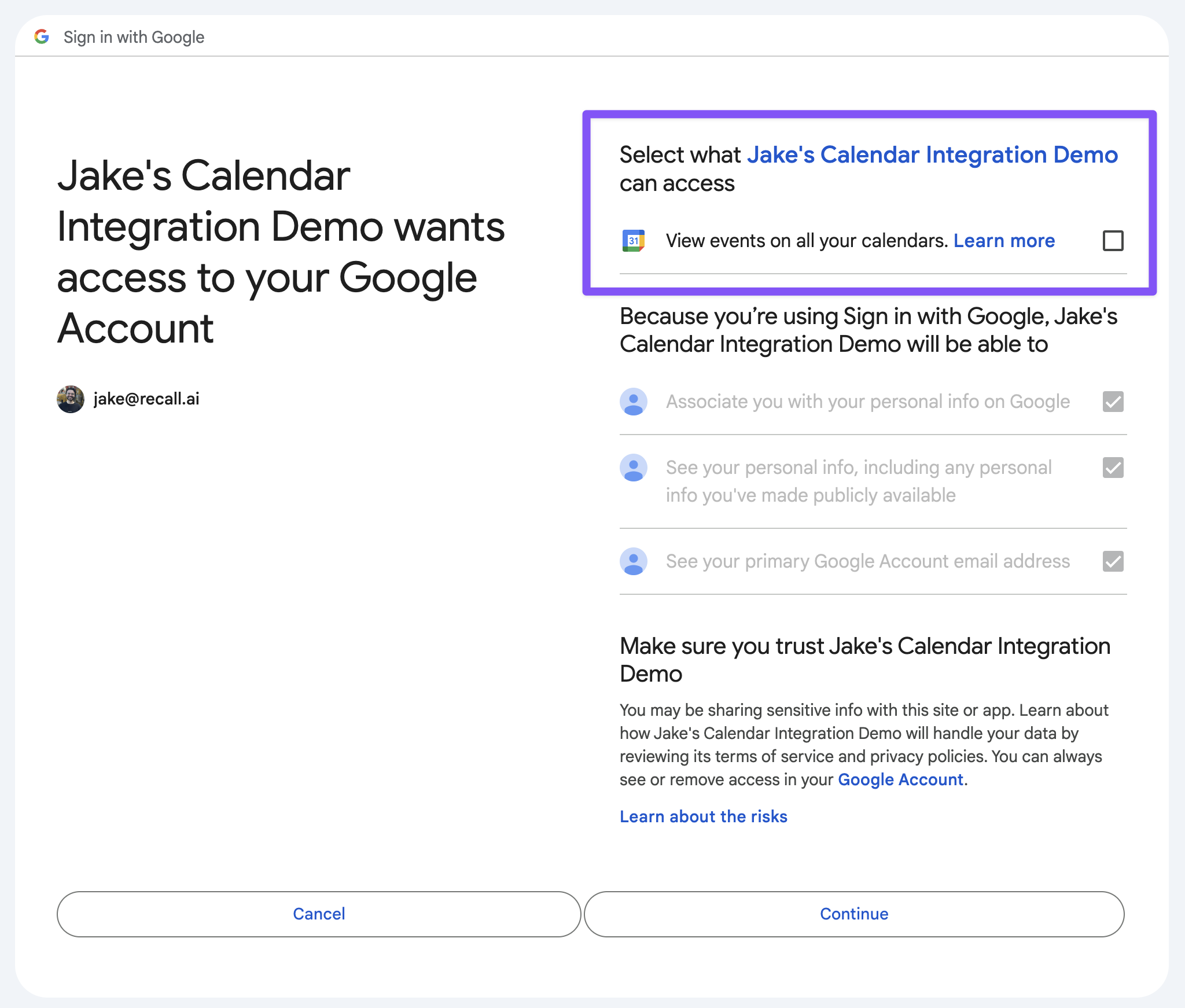
To resolve this, they should reconnect their calendar while ensuring to check this box.
Why can't I see my user's calendar events after they've connected their calendar?
We currently only sync the primary calendar of a connected user, so if their events are on another calendar, they will not be captured.
Why am I encountering error AADSTS50194 when my customers try to connect their Outlook calendars?
If you're encountering this error, you've likely configured Microsoft app to be single-tenant rather than multi-tenant. You can follow this guide from Microsoft to see the settings to convert your single-tenant app to multi-tenant. Once you've done this, try reconnecting the failed calendar again.
How do I handle Google/Outlook events where an attendee is a distribution list rather than an individual person?
For Google group emails, whether or not Google Calendar expands the group into all the individual members on the event actually depends on the underlying Google Group visibility settings. The calendar integration can only see whatever Google stores on the event via the Calendar API though, and similarly for MS Outlook.
The only reliable workarounds we're aware of are:
- Adding individual users as attendees instead of the group, or
- Having their Google Workspace admin adjust the group settings (e.g. who can view members) / test with a smaller "test group" to see if Google starts expanding it.
Why am I encountering Error AADSTS65004 on calendar connection?
Error AADSTS65004 means UserDeclinedConsent and occurs when the user explicitly declines, cancels, or closes the Microsoft consent screen, or when admin consent is required but not granted. It indicates that the application did not receive the required permissions to proceed, often resulting in an access_denied response. You can read more about this error here.
Why did my calendar fail to connect with the error MailboxNotEnabledForRESTAPI?
MailboxNotEnabledForRESTAPI?The error you encountered, MailboxNotEnabledForRESTAPI, typically occurs when either:
- The account uses an on-prem Outlook/Exchange mailbox, which we currently do not support.
- The Work/School account lacks the required M365 license (e.g., no Exchange Online mailbox enabled), causing Microsoft to block Graph/REST access
You should double check with your Microsoft/IT admin whether:
- The mailbox is not using an on-prem Outlook/Exchange mailbox and
- The user has an active M365 license that includes an Exchange Online mailbox
Updated about 14 hours ago